How we built Microsoft license renewal reminder workflow that works "well enough"
Feb 5, 2026
Every MSP manages Microsoft licenses, and as we all know, staffing changes are inevitable. People join and leave companies throughout the year, often leaving behind idle licenses that are no longer needed. Proactively informing a customer of these idle licenses and making a recommendation before renewal is a massive trust-earning gesture. It’s one of those "little things" that adds a personal touch to your service.
This is all well-intentioned—until it becomes too time-consuming and cumbersome to manage manually. Effectively, it’s a "three-tab switch" between the PSA (Syncro in our case), Microsoft (we use CIPP to proxy), and your Distributor (Pax8, in our case). Even with well-written email templates, the process is a perfect use case for automation.
The Initial Blueprint
We started out simple, building a workflow that has three sections: 1) Gather data from various sources, 2) Compare discrepancies, and 3) Create proper notifications. We try to keep the workflow short but logically separated.
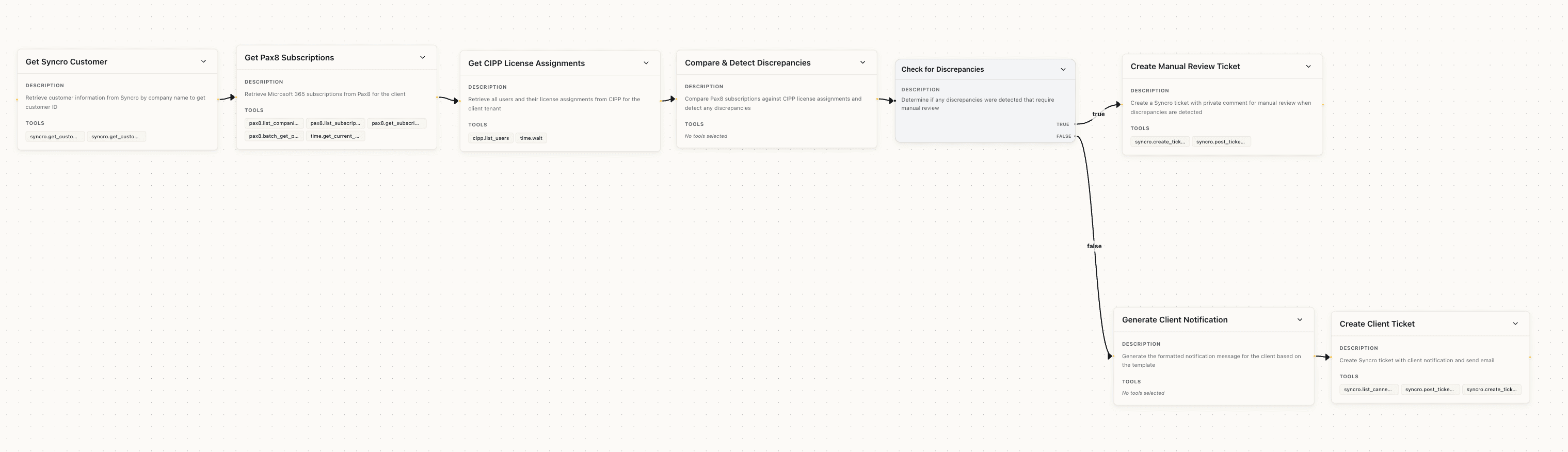
When we ran this workflow on 10 tests, it failed 9 times.
The Reality Check: Data is Messy
The first batch of problems centered around data lookups:
Name Inconsistency: Customer name is inconsistent between Pax8 and Syncro, for example, Syncro has “ACME Inc”, but Pax8 has “ACME, Inc.”. The extra “,” and “.” are enough to make the underlying API call fail, as it requires exact string match
Lack of Common Identifiers: Pax8 subscription didn’t include product names (e.g. Microsoft Business Standard) so Agents are matching Pax8 line items based on license count. When no matches found, agents hallucinate. This is bad.
Irrelevant Data: Pax8 returned subscriptions that are active but renewal date are far out in the future. While they are relevant from API response, they are not relevant for renewal reminder
Data not available: Microsoft tenant look-up were slow and frequently failed under high load
It was disappointing, but the problems were solvable. We needed to engineer higher-quality data.
Re-Architecting for Resilience
We redesigned the workflow to auto-recover from transient data collection failures. For example, we used prompts like: “If you receive a ConnectionTime error from Microsoft, use the time.wait tool to wait 10 seconds and retry; wait for up to a total of 30 seconds.”
We also added tools to pull specific Pax8 product names and modified the logic to ignore noise: “Do not process subscriptions whose renewal date is more than 2 months away.” We even added a conditional node to create a ticket for a human to clean up data when it couldn’t be matched automatically.
We further added error handle branch - a conditional node to create a ticket to clean up data when data cannot be found properly, and document the error case.
Great, all the data cleaning is done. Now the workflow starts like this:
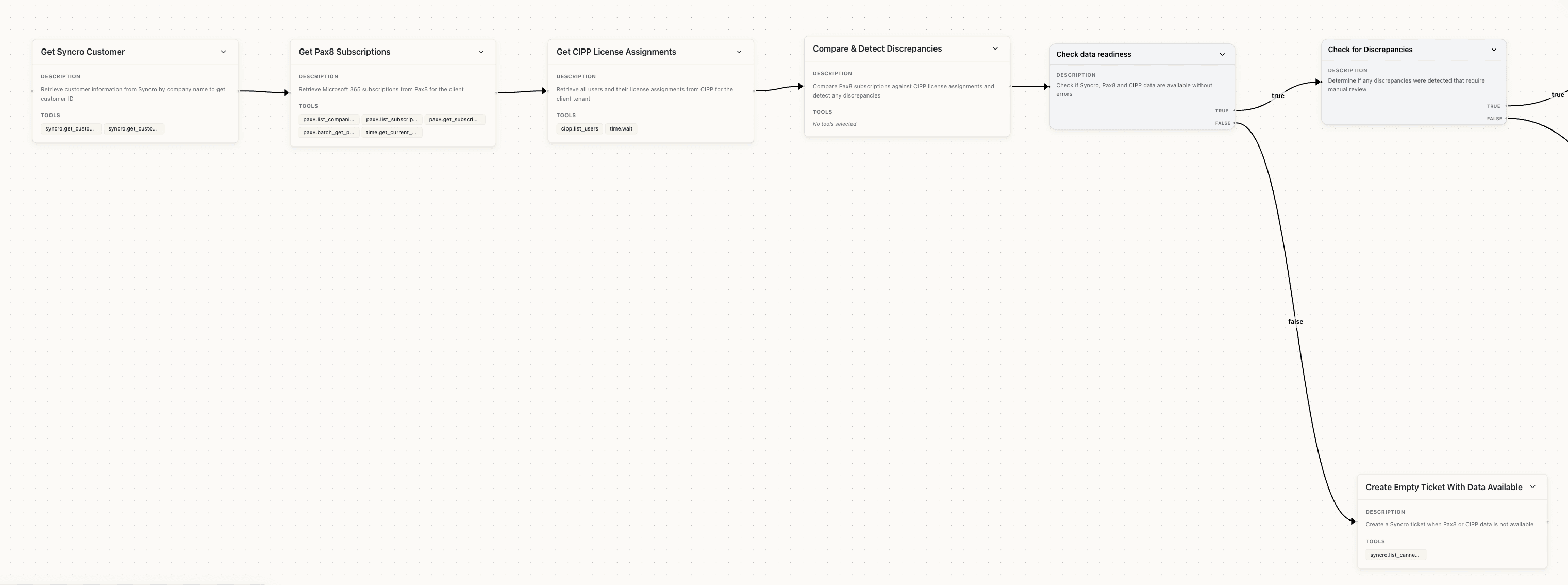
We felt good. We fixed the data issues. We were ready to go. We tested the next 10 upcoming renewals. The data-missing problems were gone, but 7 out of 10 still didn't show exact match, and were sent for human review.
"Real-World" Complexity
After a deep dive into each manual review, we started uncovering real business complexity:
The workflow found that Pax8 had more licenses procured than licenses being assigned in Microsoft - a legitimate discrepancy that warrant communication with clients
The workflow identified some licenses are monthly term and some license are annual term, so they don’t line up when compared individually
The workflow used the wrong first name, because it was using the email prefix to infer the name of the user (putting “Hello System” to the email for system@abc.com)
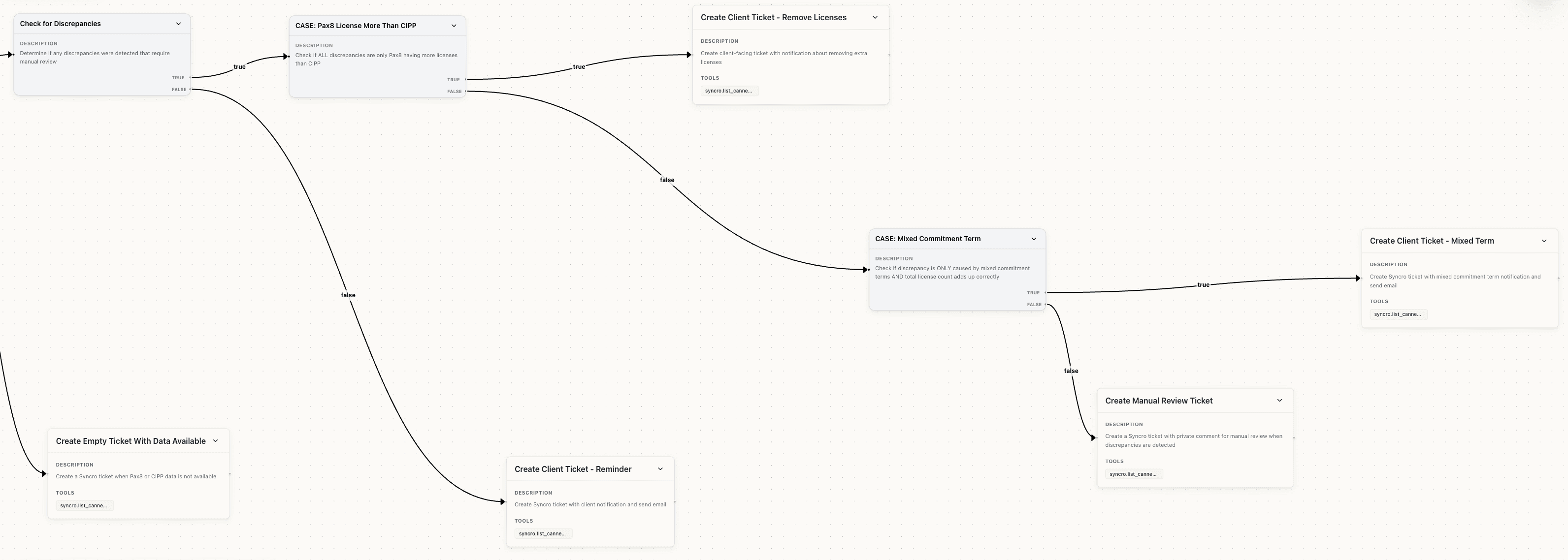
Although the workflows failed, these issues started to look like real scenarios that we want to handle. Specifically, for the first two scenarios, we decided to explicitly write a different notification template for these cases - if a license count reduced, we would make a recommendation to decrease the license count; if a commitment term is mismatched, we would make a recommendation to align to annual term. Although this only saves clients' a little bit of money, it reminds your client that you are staying on top of their IT needs and are doing constant work to make things better.
For the third issue, it would require us to backfill the entire PSA with correct contact names. We came up with temporary arounds: for the third issue, we changed the email template to stop addressing the “person” but address the “company” instead, eliminating the need of accurately finding first name. Here is the second half of the workflow:
Accepting the 80/20 Rule
Instead of spending days trying to hit 100% perfection—where the effort exceeds the time saved—we accepted that AI would do 80% of the heavy lifting, leaving the final 20% to a human.
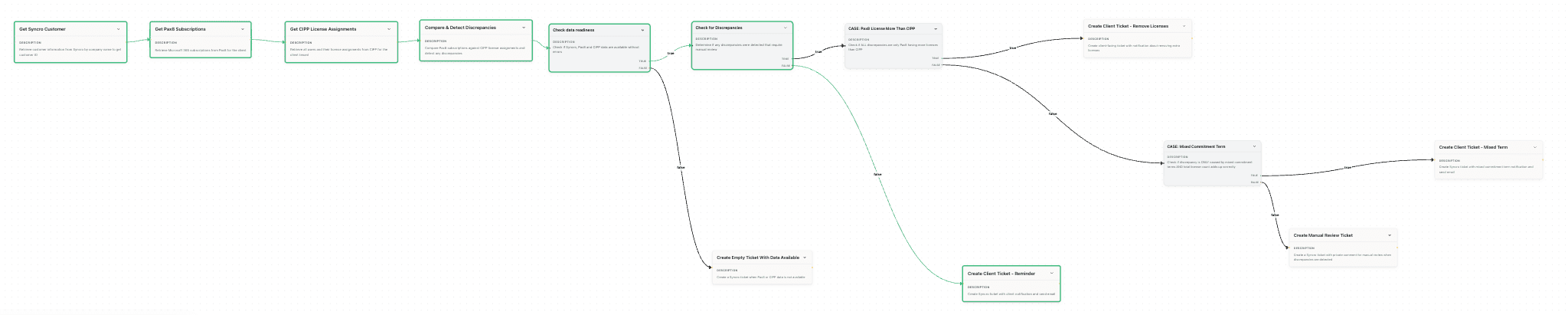
We ran the next 5 companies whose licenses are up for renewal. There were still issues (e.g. Microsoft API being unreliable for large clients), but our new workflow correctly handled all 5 renewals and generated renewal reminders that look pretty much the same as what a human would have written. We had human reviewing its work side by side, and it even correctly identified an extra license that the human missed. Hooray! That just saved half an hour right there! Look at this sweet graph!
The Takeaways
To summarize the learnings from this experience, here is the lessons to take with you:
AI isn't fully autonomous yet: It still requires humans to handle the final 10% of edge cases or review the output. However, it does eliminate the tedious "copy-paste" grind.
Data Inconsistency is the real enemy: Most limitations aren't caused by the workflow itself, but by mismatched data across systems. Standardization is an expensive one-time effort that pays off forever.
Workflow needs continuous iteration: As we uncover more edge cases and see patterns, we continue to build on top of existing workflows to handle those cases and improve automation.
More tips on building your own agentic workflows:
Start with a skeleton. Gradually add edge-case handling as you discover it in production.
Separate Data Collection from Action. Ensure your data collection is rock-solid before you let an agent take an action (like sending an email).
"Dry Run" first. Always run a "Dry Run" version of your workflow first. This saves you from having to delete dozens of "bad" tickets created during the learning phase.
After 6 hours of building, we have a reliable system that saves several hours every month. We’ll break even on our time investment within eight weeks. Not a bad ROI for a few hours of "vibe-coding"!